Wingline · In public beta
Wingline: an AI texting assistant in the iPhone keyboard
Built and shipped on my own
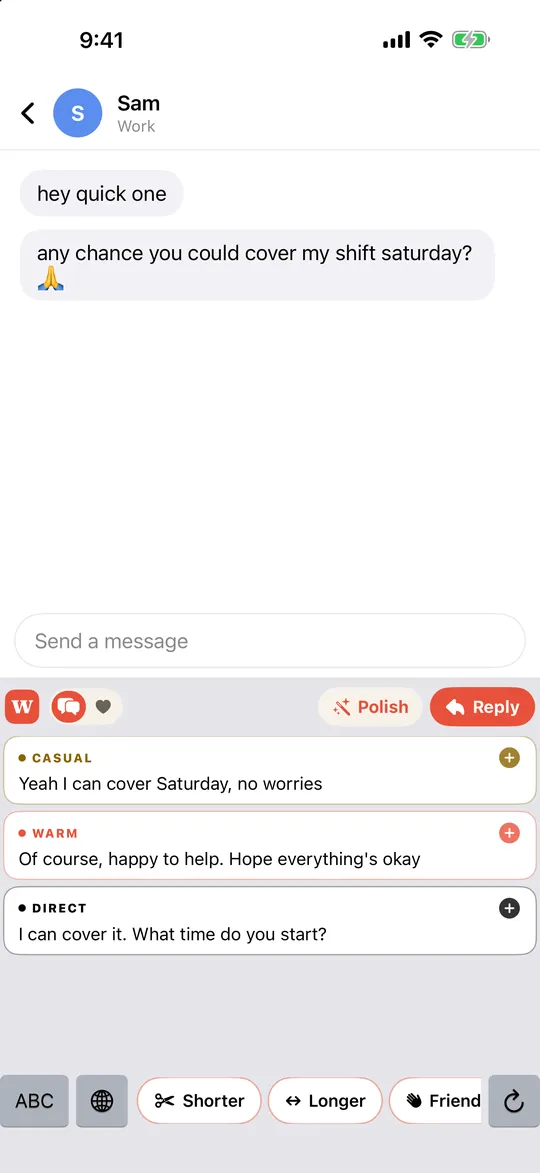
Wingline is an AI texting assistant that lives in the iPhone keyboard. Copy a message and tap Reply for three options in your own texting style, tap Polish to clean up a draft without sounding like a robot, or get dating openers written from the other person's actual profile.
- free public beta on TestFlight
- Beta
- Apple Intelligence by default
- On-device
The problem
Most AI writing help lives in a separate app, which means copying, switching and pasting in the middle of a conversation. And people are rightly wary of anything that reads what they type.
Approach
- Put the assistant where people already type: a full custom keyboard with autocorrect, predictions and an Apple-style emoji panel.
- Run on-device with Apple Intelligence; use the cloud only after the user opts in.
- Three modes: Reply, Polish and dating openers.
Architecture
- iOS keyboard extension with on-device generation through Apple Intelligence.
- A backend used only for opted-in cloud requests, protected with App Attest and rate limits.
- Never logs keystrokes.
Status
- Free public beta on TestFlight; the App Store version is in review.
Stack
- iOS keyboard extension
- Apple Intelligence
- App Attest
More case studies
- Climb Together · May 2025 to presentGoldi: a production AI career coach for 100K+ usersHow Akshay Kalapgar built Goldi at Climb Together: a Claude-powered career coaching agent with tool calling, voice and SMS that reached 100K+ users.Read the Goldi case study
- Softmax · Nov 2025 to Apr 2026MCP servers, Claude Code plugins and agent toolingAkshay Kalapgar's MCP tool harnesses and Claude Code plugins: 86 skills across 6 plugins for agent workflows, plus the platform that runs the agents.Read the MCP servers and Claude tooling case study
Back to Akshay Kalapgar's homepage or get in touch about AI agent roles.